Manual entries
Last updated: July 2026
Not every bit of work runs through a timer. For forgotten stretches, work on the go, or flat blocks, you add entries by hand — with a start and end you choose freely.
Add an entry
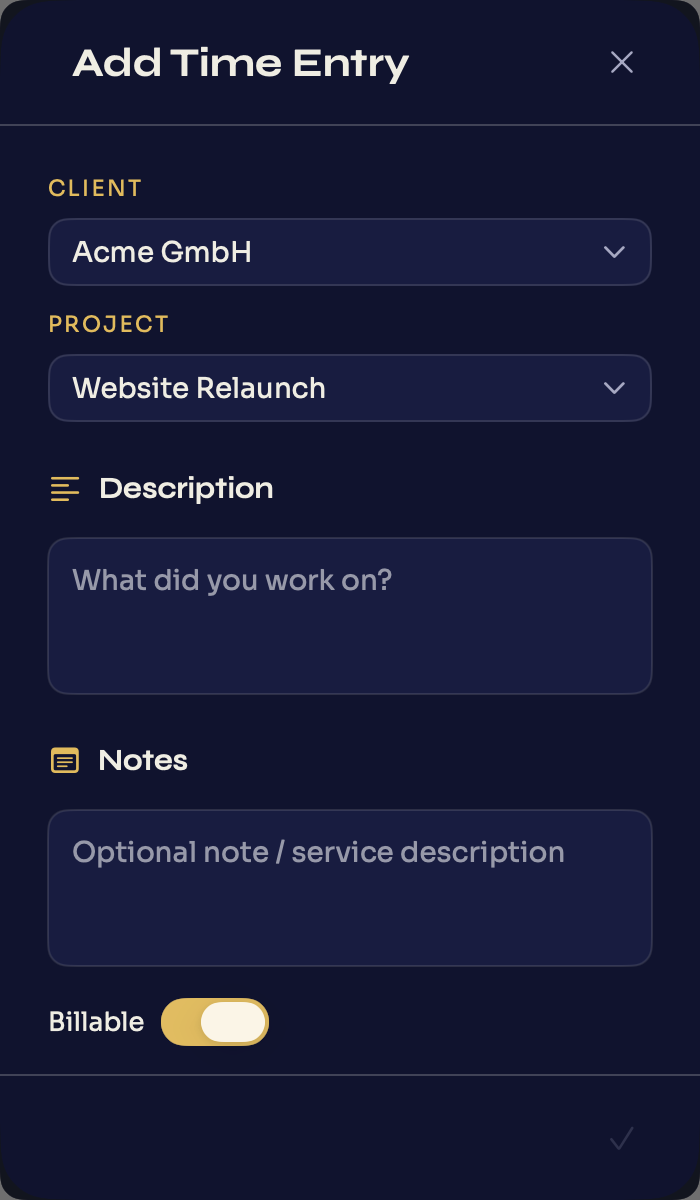
„Time entry" in the footer opens the „Add Time Entry" sheet. There you pick „Client" and „Project" from the dropdowns („Choose a client" / „Choose a project"), write what you worked on under „Description", and optionally add „Notes" — for example a service description for the invoice. The „Billable" toggle decides whether the time counts toward earnings. For how to phrase a description so a client approves it fast, see how to write a timesheet.
Set the times
Under „Time Details" you set „START" and „STOP"; Døgn shows the resulting „Duration". If the end is before the start, Døgn flags it with „End must be after start." „Save Entry" creates the entry.
Note: before you can track manually, at least one client and one project must exist — otherwise Døgn reminds you with „Create a client and a project first." See Clients & projects.
Edit or delete an entry
You open existing entries as „Edit Time Entry". Here you change client, project, description, notes, the billable status and the times, and commit with „Save Changes". „Delete" removes an entry; Døgn asks first, since deleting cannot be undone.