Tracking time
Last updated: July 2026
The heart of Døgn is the running timer. You start it for a project, work, and stop it again — Døgn turns that into a billable time entry. Everything happens right in the popover.
The popover at a glance
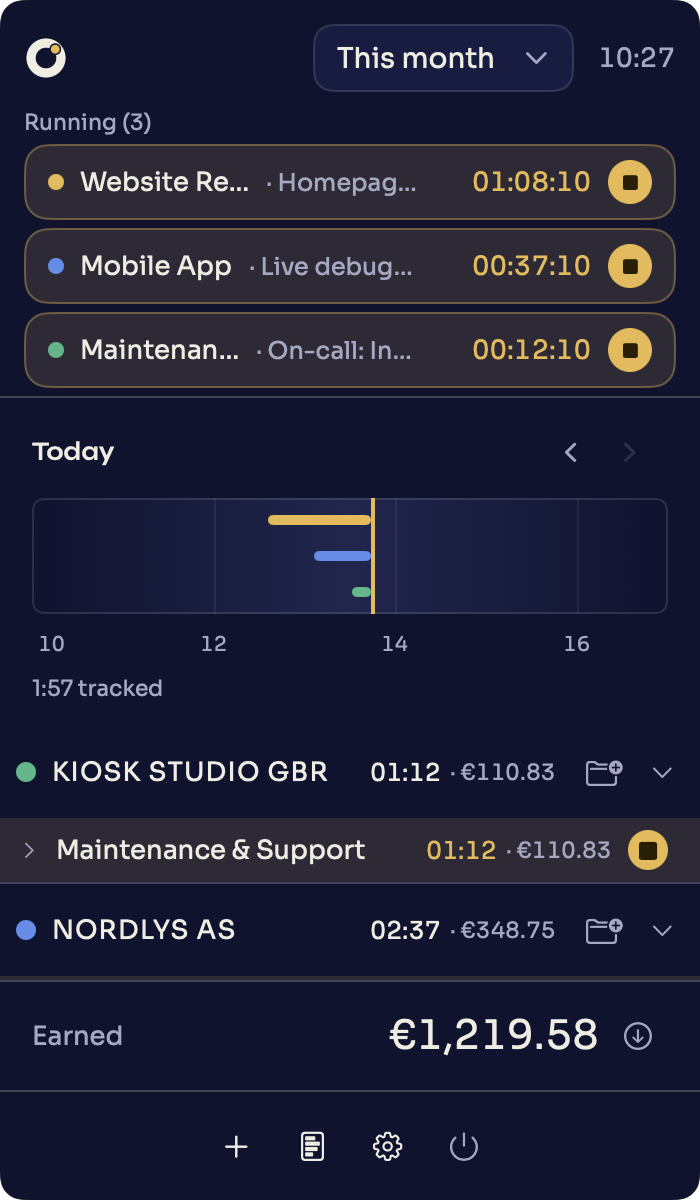
At the top of the popover you choose the period, with the day timeline below it. Then comes the list of your clients with their projects, hours and amounts. A running timer is highlighted in gold. At the bottom, the „Earned" row shows the total for the chosen period, with the export next to it. The footer bundles „Time entry", „Reports" and „Settings".
Start and stop a timer
To start a timer, pick the project you are working on in the popover. Døgn asks „What are you working on?" — describe the task briefly or leave the field empty, in which case Døgn records „Working on [project]". „Start" runs the timer. You end the running timer with „Stop"; it becomes a time entry.
Parallel timers
When you need it, Døgn allows several timers in parallel. When two or more are running, the popover groups them under „Running" and you end a specific one with „Stop this timer". That way you can separate focused work from an on-call project ticking away alongside it. For when concurrent work is fair to bill — and when to split it instead — see parallel time tracking.
Suggestions
Døgn remembers what you last worked on and surfaces fitting suggestions — marked with „SUGGESTION" and a reason such as „Recently used". A click on the suggestion starts the matching timer, without clicking through the list.
The period picker
The picker at the top of the popover determines which period the list and the earnings total cover. The options are „This week", „Last week", „This month", „Last month", „This year" and „All time". The default is „This month".